
TFT Unlock Tool v6.2 Pro Setup Free Download (All Mobile)
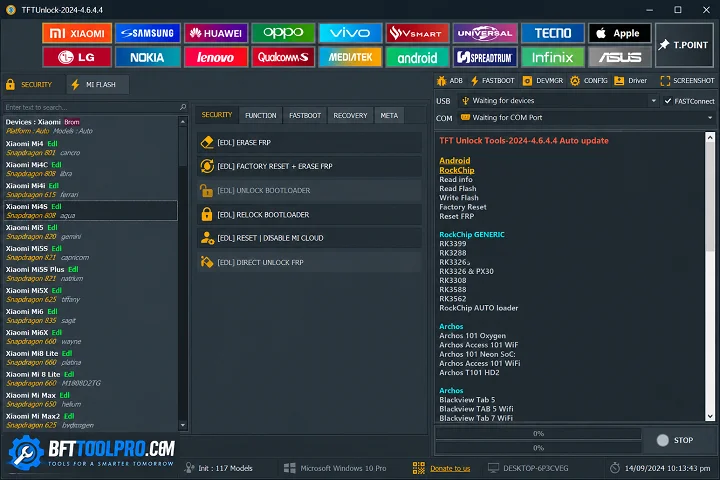
Android phones can develop frustrating software problems such as FRP verification, screen locks, boot errors, or firmware issues. TFT Unlock Tool is a Windows-based Android servicing utility that brings several repair and maintenance functions into one place. It supports selected MediaTek and Qualcomm devices and is designed for technicians and users working on supported phones.
You Can Also Use: BFT Tool v1.8 Pro Version Free Download Setup By BossV
What Is TFT Unlock Tool?
TFT Unlock Tool v6.2 is an Android servicing software designed to handle common software-related tasks on compatible devices. Its listed functions include FRP-related servicing, screen-lock operations, firmware flashing, bootloader management, ADB, Fastboot, and device information.
The tool supports various Android brands, including Samsung, Xiaomi, OPPO, Vivo, Realme, Motorola, Huawei, Infinix, and Tecno, although compatibility can vary by model and Android security version.
TFT Unlock Tool v6.2 Key Features 2026
FRP Servicing
TFT Unlock Tool provides FRP-related functions for supported Android devices. These operations should only be performed on devices you own or are authorized to service.
Screen Lock Servicing
The tool includes screen-lock functions for compatible phones. Available operations may vary depending on the device model and security version.
Firmware Flashing
TFT Unlock Tool can be used to flash compatible stock firmware on supported devices. Using the correct firmware is important to avoid software or compatibility problems.
Bootloader Management
The tool includes bootloader-related functions for supported devices. Bootloader operations can change the phone’s security state and may erase user data.
IMEI & Software Repair
The provided feature list includes IMEI-related and software repair functions. IMEI operations should only be used for legitimate repairs and with the device’s original identification information.
ADB & Fastboot Support
TFT Unlock Tool supports ADB and Fastboot workflows on compatible Android phones. These modes can help with device information, troubleshooting, and supported servicing operations.
MediaTek & Qualcomm Support
The tool supports selected MediaTek (MTK) and Qualcomm chipset-based devices. Exact functions depend on the connected model and its security configuration.
Multi-Brand Compatibility
TFT Unlock Tool is listed as supporting brands such as Samsung, Xiaomi, OPPO, Vivo, Realme, Motorola, Huawei, Infinix, and Tecno. Always confirm compatibility before starting a repair operation.
Device Information
The tool can provide device-related information on supported phones. This can help technicians identify the model, software version, and other available details before servicing.
Simple Interface
TFT Unlock Tool uses a straightforward interface that can make common servicing tasks easier to manage. Beginners should still understand the selected operation before starting it.
What’s New in TFT Tool?
- Support for additional Android devices
- Improved compatibility with supported FRP functions
- Better firmware flashing stability
- Updated ADB and Fastboot functions
- Enhanced MediaTek and Qualcomm support
- Bug fixes and performance improvements
- Better compatibility with newer Android versions
- Interface improvements for easier navigation
Pros & Cons
Pros:
- Supports MediaTek and Qualcomm devices
- Includes firmware flashing functions
- ADB and Fastboot support
- Multi-brand Android compatibility
- Simple interface for common servicing tasks
Cons:
- Device support varies by model
- Some functions depend on Android security versions
- Certain operations may erase user data
- Correct USB drivers are required
- Advanced functions require technical knowledge
How To Download, Install, and Use TFT Unlock Tool?
- Download the TFT Unlock Tool from the link or a trusted Website.
- Extract the downloaded ZIP/RAR package.
- Open the extracted folder.
- Run the setup or executable file.
- Launch the tool as Administrator.
- Install the required USB drivers.
- Connect the supported Android device with a reliable USB cable.
- Select the appropriate chipset and servicing function.
Conclusion
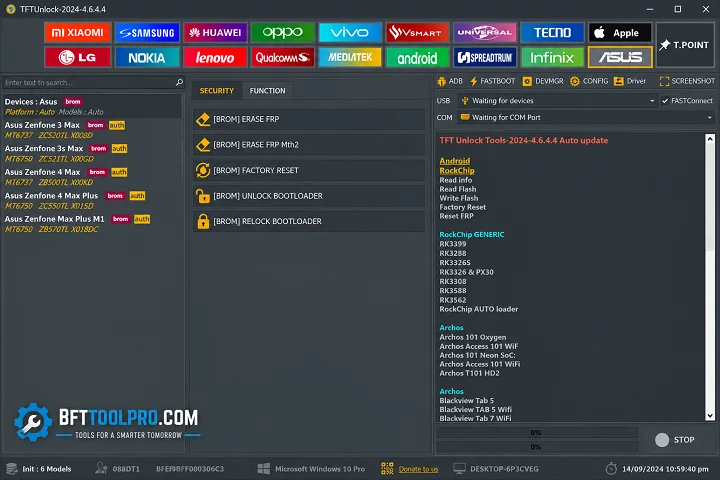
TFT Tool 6.2 is a Windows-based Android servicing utility with features for firmware flashing, FRP-related servicing, screen-lock operations, ADB, Fastboot, and chipset-specific workflows. Its multi-brand support makes it useful for working with selected Samsung, Xiaomi, OPPO, Vivo, Realme, Motorola, Huawei, Infinix, and Tecno devices. Always verify device compatibility, firmware, and the purpose of each operation before starting a repair.
FAQ's
Is TFT Unlock Tool free?
Some versions of TFT Unlock Tool may be available free of charge, while certain releases or functions may have different activation requirements.
Which Android brands does TFT Unlock Tool support?
The provided information lists Samsung, Xiaomi, OPPO, Vivo, Realme, Motorola, Huawei, Infinix, Tecno, and other supported Android devices.
Does TFT Unlock Tool support MediaTek and Qualcomm?
Yes. The provided feature information lists support for both MediaTek (MTK) and Qualcomm devices.
Can TFT Unlock Tool perform firmware flashing?
Yes, firmware flashing is one of the listed functions for compatible Android devices. Always use firmware that matches the exact device model.
Is TFT Unlock Tool suitable for beginners?
Its interface is designed to be straightforward, but advanced Android servicing operations still require proper technical knowledge and caution.