
BFT Tool v1.8 Pro Version Free Download Setup By BossV
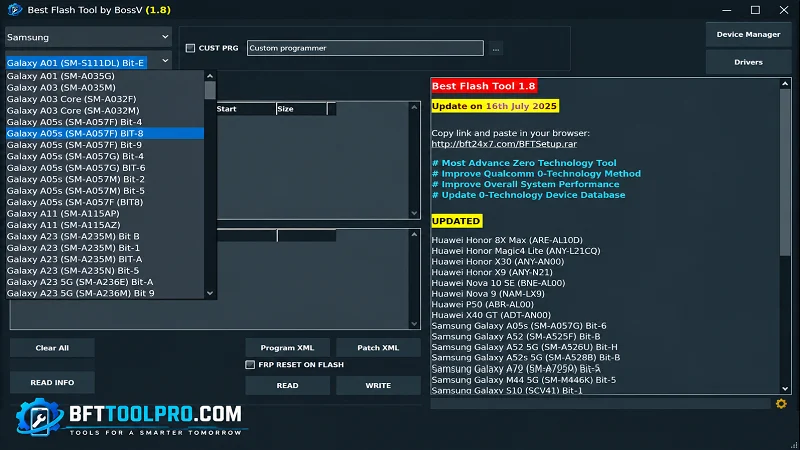
Android phones can be difficult to repair when software, FRP, screen-lock, bootloader, or firmware issues occur. BFT Tool V1.8 provides a simple Windows-based solution for supported devices, offering flashing, FRP servicing, screen-lock tools, ADB/Fastboot, and chipset support. It helps technicians handle different Android servicing tasks from one convenient utility.
You Can Also Use: TFT Unlock Tool
Why Use BFT Tool?
BFT Tool 1.8 Latest Version is useful when a supported Android device needs software-level servicing rather than ordinary phone settings.
Common use cases include:
- Firmware installation
- Software recovery
- FRP-related servicing
- Screen-lock servicing
- Factory reset
- Bootloader management
- IMEI-related repair
- ADB operations
- Fastboot operations
- Qualcomm servicing
- MediaTek servicing
- Unisoc servicing
- Dead-boot software recovery
Instead of switching between multiple utilities for every platform, BFT Tool attempts to keep several common operations under one dashboard.
BFT Tool V1.8 Key Features
Firmware Flashing
Best Flash Tool supports firmware flashing on compatible Android devices with software issues. Always use the correct firmware for the exact device model.
FRP Servicing
The tool provides FRP-related servicing functions for supported devices. Use these functions only on devices you own or are authorized to repair.
Screen Lock Operations
BFT Tool includes screen-lock servicing options for compatible devices. Support may vary depending on the model and Android security version.
Factory Reset
The tool can perform factory reset operations on supported Android devices. A reset may erase all user data, so back up important files first.
Bootloader Unlock & Relock
This tool provides bootloader unlock and relock functions for compatible devices. These operations can change the device security state and may erase data.
IMEI-Related Repair
The supplied feature list includes IMEI-related repair functions. Use them only for legitimate device servicing and according to applicable laws.
ADB & Fastboot Support
It also supports ADB and Fastboot workflows for compatible Android devices. These modes can help with device information, boot modes, and software servicing.
Qualcomm Support
The tool includes Qualcomm servicing support for compatible Android devices. Available functions depend on the device model and security configuration.
MediaTek / MTK Support
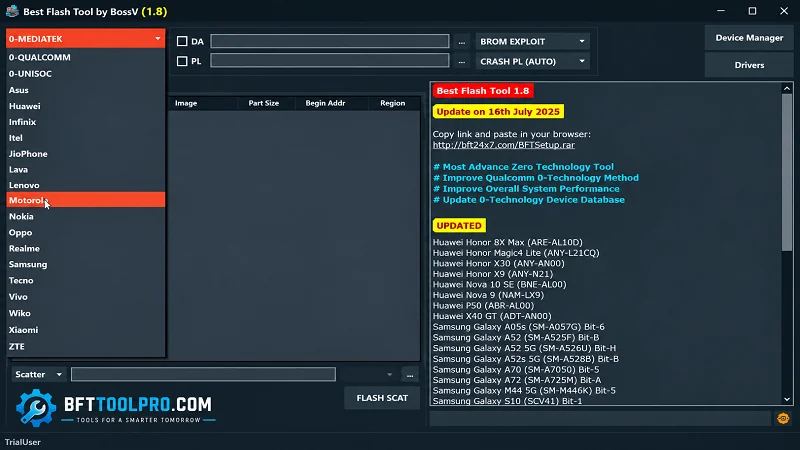
BFT Tool supports selected MediaTek devices for various software servicing tasks. Required connection modes and drivers may vary by device.
Unisoc / SPD Support
The tool also provides Unisoc/SPD support for compatible Android phones. This gives technicians another chipset workflow within the same utility.
Dead Boot Repair
This tool is presented with dead-boot repair support for compatible devices. Success depends on the chipset, model, firmware, and type of software failure.
What’s New In BFT Tool 2026?
- Firmware flashing
- FRP-related servicing
- Screen-lock operations
- Bootloader unlock/relock
- Factory reset
- IMEI-related repair
- ADB support
- Fastboot support
- Qualcomm support
- MediaTek support
- Unisoc/SPD support
- Dead-boot software repair
- Multi-brand Android support
Pros & Cons In BFT Tool
Pros:
- Supports Qualcomm, MediaTek, and Unisoc devices
- Firmware flashing support
- FRP and screen-lock servicing
- ADB and Fastboot functions
- Wide Android brand support
Cons:
- Device support varies by model and security version
- Some operations may erase user data
- Advanced functions require technical knowledge
System Requirements For Download BFT Tool Setup
| Requirement | Specification |
|---|---|
| Operating System | Windows 7, 8, 10, 11 |
| Architecture | 32-bit & 64-bit |
| Processor | Intel or AMD Dual-Core or higher |
| RAM | 4 GB minimum |
| Recommended RAM | 8 GB |
| Storage | At least 500 MB free |
| USB | Working USB port |
| Drivers | Android/Qualcomm USB drivers as required |
How to Download, Install & Use BFT Tool V1.8?
- Download: Get BFT Tool V1.8 from the link or a trusted website.
- Extract: Unpack the ZIP/RAR file.
- Install Drivers: Set up the required USB drivers.
- Connect Device: Use a reliable USB cable.
- Run Tool: Launch BFT Tool as administrator.
- Select Platform: Choose Qualcomm, MediaTek, or Unisoc.
- Choose Function: Select the required servicing option.
- Check Details: Verify the model and firmware.
- Start Process: Click Start and wait.
- Restart Device: Reboot after completion.
Final Thoughts
BFT Tool V1.8 is a convenient Windows utility for supported Android flashing and servicing tasks. It supports Qualcomm, MediaTek, Unisoc, ADB, Fastboot, FRP, and firmware functions. Overall, it helps technicians manage multiple Android repair workflows from one place.
FAQ’s About BFT Tool
What is BFT Tool V1.8?
BFT Tool V1.8 is a Windows-based Android servicing utility for supported devices. It provides firmware flashing, FRP-related servicing, screen-lock operations, bootloader functions, and chipset-specific tools.
Which chipsets does BFT Tool support?
The supplied feature list includes Qualcomm, MediaTek, and Unisoc/SPD platforms.
Which Android brands are supported?
The provided information mentions Oppo, Vivo, Xiaomi, Redmi, Infinix, Tecno, Samsung, Huawei, Realme, and Motorola, among other supported devices.
Is BFT Tool suitable for beginners?
Its interface is designed to be straightforward, but several functions are advanced. Beginners should carefully verify the device and understand the selected operation before starting.